import requests
import pandas as pd
# from bs4 import BeautifulSoup
from lxml import html
import pprint

# get the html
cb_url = "https://www.census.gov/programs-surveys/household-pulse-survey/data/datasets.2023.html"
cb_resp = requests.get(cb_url)

# initiate a parser for the page source
cb_src = html.fromstring(cb_resp.content)Simple web scraping with Python
Camille Seaberry
Queercoded
2026-06-06
Intro
- Slides are online camille-s.github.io/webscraping
- So is the code that generates them
camille-s/webscraping
What is web scraping?
Web scraping is automation to go through tasks of getting documents from the internet and pulling information out of them
- Avoids routines of clicking on things on websites
- Run on a schedule
- Can crawl large websites
Why?
- Personally I mostly use scraping to batch download data
- Sometimes use it to get data out of allegedly-open data portals
- Support advocacy (friends & colleagues scrape court dockets & eviction filings, e.g.
dismantl/CaseHarvester)
- Other uses include testing during web development or monitoring website changes
- Also lots of bro applications, like info on crypto or training LLMs or whatever
Tools
I mostly work in R, so if the HTML I’m after is static, I’ll use R (
If it isn’t static I switch to Python to use Selenium within a Docker container
Other tools
Other tools I don’t have much/any experience with include
puppeteer/puppeteer scrapy/scrapy - Libraries that build on the Chrome DevTools Protocol
- Other point-and-click / automated options
Also the RSelenium package is too outdated to use currently but is being developed again
Static websites
Static websites have their content ready to go when you visit them. They require fewer tools for scraping because you can just read the HTML and parse out what you need from it.
Example 1: extract URLs
This is a simplified version of a project I’ve done to batch download, clean, and build a database from the microdata for the Census Bureau’s Household Pulse Survey.
About the data
- Started as rapid response at the beginning of covid lockdown
- Pandemic lasted longer than expected, so the survey did too
- As a result, infrastructure is messier than Census Bureau products would normally be
- Contained a (poorly worded) question on gender identity for later survey waves
- One of very few sources to do so, which is main reason I’ve used it
The task
- Each year of the survey is on a different page, reached by a link on a tab
- Each iteration has a block of HTML with varying structure
- Release date or cycle
- Date range of survey
- Links to zipped SAS & CSV files, sometimes supplemental files
- Organized non-semantically into phases
- Inconsistent naming
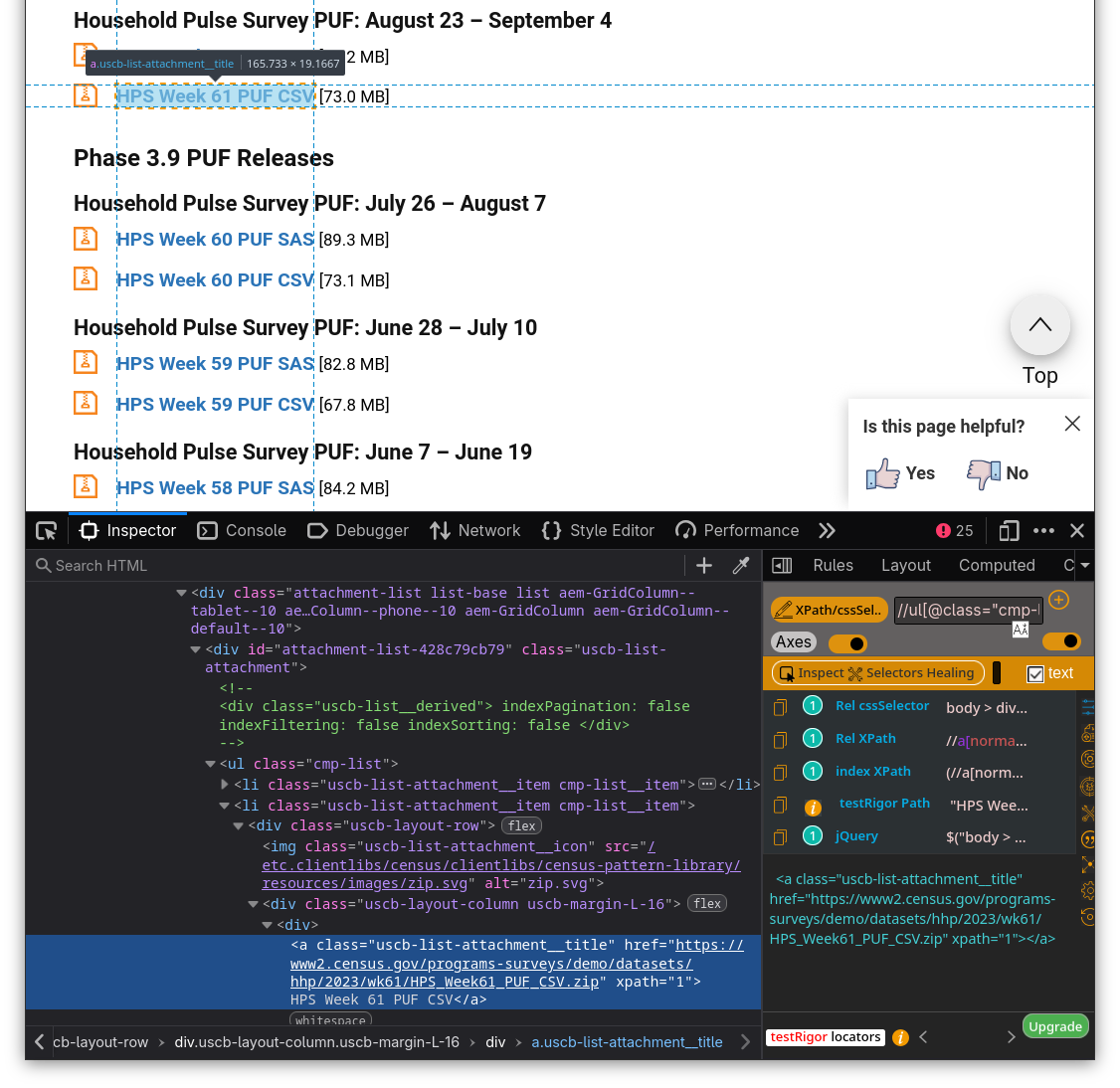
Get to know the HTML
Find links to CSV files & mark with release dates/cycles
- Browser devtools help you investigate HTML, figure out what elements you’re looking for
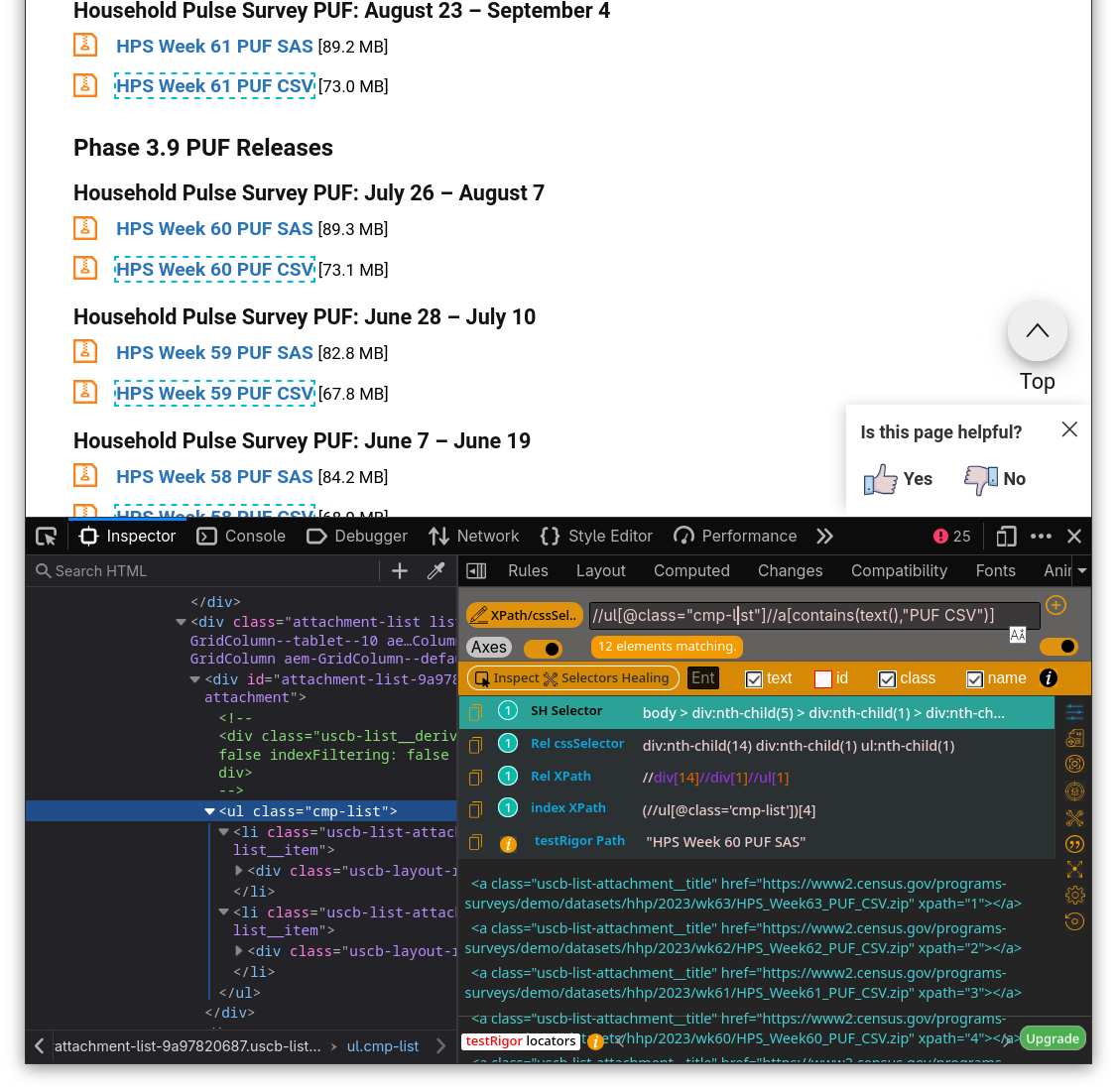
- Extensions can help verify XPath/CSS selectors
Selectors
- Main types of selectors are CSS and XPath. Both are more complex than I can get into.
- CSS is simple but less flexible; XPath is much more powerful but tricky
- Excellent XPath cheatsheet at devhints.io/xpath
Let’s write code!
Read the page source and set up a parser
The information we want is hierarchical, but the HTML is not. So we have to dump everything into a list and nest it ourselves.
XPath for <h3>, <h4>, and <a> elements of interest:
//h3[contains(text(),"Phase")]//h4[contains(text(),"Household Pulse Survey PUF")]//ul[@class="cmp-list"]//a[contains(text(),"PUF CSV")]
Luckily can combine all selectors into single XPath selector
- {BeautifulSoup} package is very popular but doesn’t take XPath
- {lxml} handles XPath so I’ll use it
Parsing
- For each element, get its tag and text
- If an
<a>, also get itshrefattribute
[{'tag': 'h3', 'text': 'Phase 3.10 PUF Releases', 'href': None},
 {'tag': 'h4',
  'text': 'Household Pulse Survey PUF: October 18 - October 30',
  'href': None},
 {'tag': 'a',
  'text': 'HPS Week 63 PUF CSV',
  'href': 'https://www2.census.gov/programs-surveys/demo/datasets/hhp/2023/wk63/HPS_Week63_PUF_CSV.zip'}]
Clean up
Make a {pandas} DataFrame to clean up the data
| tag | text | href | |
|---|---|---|---|
| 0 | h3 | Phase 3.10 PUF Releases | NaN |
| 1 | h4 | Household Pulse Survey PUF: October 18 - Octob... | NaN |
| 2 | a | HPS Week 63 PUF CSV | https://www2.census.gov/programs-surveys/demo/... |
| 3 | h4 | Household Pulse Survey PUF: September 20 - Oct... | NaN |
| 4 | a | HPS Week 62 PUF CSV | https://www2.census.gov/programs-surveys/demo/... |
Create properly nested data
Extract headers for each survey wave
Create properly nested data
Fill missing headers, then filter to keep one row per survey wave
Finally have data
| phase | wave | name | url | |
|---|---|---|---|---|
| 2 | Phase 3.10 PUF Releases | Household Pulse Survey PUF: October 18 - Octob... | HPS Week 63 PUF CSV | https://www2.census.gov/programs-surveys/demo/... |
| 4 | Phase 3.10 PUF Releases | Household Pulse Survey PUF: September 20 - Oct... | HPS Week 62 PUF CSV | https://www2.census.gov/programs-surveys/demo/... |
| 6 | Phase 3.10 PUF Releases | Household Pulse Survey PUF: August 23 – Septem... | HPS Week 61 PUF CSV | https://www2.census.gov/programs-surveys/demo/... |
| 9 | Phase 3.9 PUF Releases | Household Pulse Survey PUF: July 26 – August 7 | HPS Week 60 PUF CSV | https://www2.census.gov/programs-surveys/demo/... |
| 11 | Phase 3.9 PUF Releases | Household Pulse Survey PUF: June 28 – July 10 | HPS Week 59 PUF CSV | https://www2.census.gov/programs-surveys/demo/... |
That’s it! (kinda)
We have a collection of 12 links to batch download our data.
In my real project, I had to then parse all the dates and standardize labels, then do that for every year (this was the simplest year). 60 waves of the survey total.
After writing out all this metadata, I wrote a bash script to download all the data files and write them into a database. Then I set that up to run in GitHub Actions to check for updates & rebuild the database every week.
Scraping dynamic websites
Dynamic websites don’t have all their content available when you visit a URL. Scraping is similar, but takes extra steps to finagle the page source
- Sites filled by API calls or other servers
- Tables generated by form choices
- Crawling over pages of results
It’s complicated
Doing this requires a few additional tools that don’t lend themselves to slides. My method is generally:
- Run Selenium in a docker container to mimic a headless browser
- Send Selenium web driver to website
- Click on stuff (forms, pager links, etc)
- Extract HTML from each iteration
- Repeat
Example 2: stream URLs
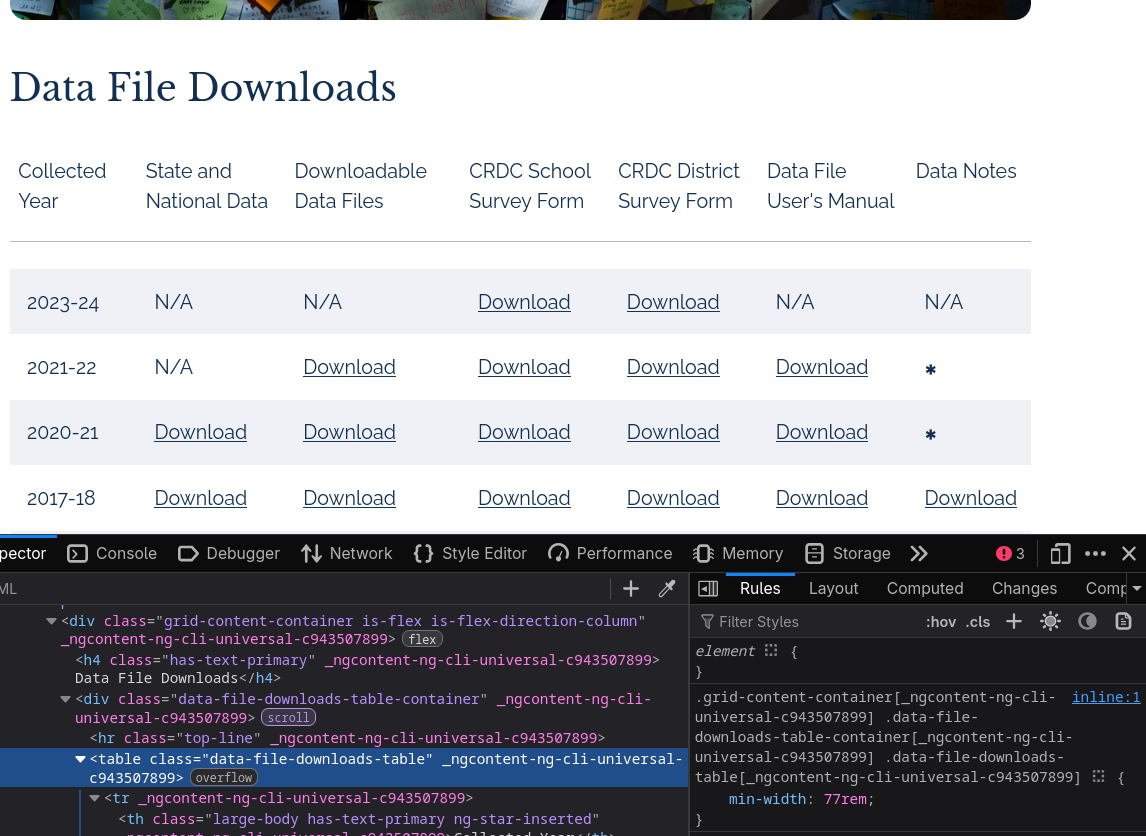
This is another batch of federal datasets, this time much better formatted but loaded dynamically.
Clearly there’s a table, but {requests} can’t get it
Selenium is fun because it’s like a ghost is using your computer
(Not that interesting because it scrapes the table very fast)
Tips for getting started
Find a website that you want data from, study it with devtools, and see what you can get out of it
Your skills get better the more determined / annoyed you are
Thanks!
Check out & fork my federal data scraping adventures while you still can
Script file
The code for this document can be found here:
camille-s.github.io/webscraping - github.com/camille-s/webscraping